



 Affiliate Disclaimer
Instagram Stories are designed to be temporary. They appear at the top of the app, stay live for a limited time, and usually disappear after 24 hours. That is why many people search for ways to see past Stories on Instagram, especially when they missed someone’s update, want to rewatch a video, need a product link, or want to check what a creator, brand, child, client, or competitor shared earlier.
The important detail is this: seeing your own past Stories is different from seeing someone else’s past Stories. Your own Stories may be available in your Instagram Story Archive unless you have turned it off. Someone else’s old Stories are only visible when the content has been saved, reposted, highlighted, shared with you, or accessed through a third-party tool.
So, can you see someone’s past Instagram Stories after 24 hours? Sometimes — but only if the content was saved somewhere. Check their Highlights first. If it’s not there, look for the same content in Reels or feed posts, search for public reposts, ask the person directly, or use a Story viewer like Peekviewer.
Disclaimer: The information in the article is for educational purposes only. Users should not use any method to stalk, harass, impersonate, bypass boundaries, or access content they are not allowed to view. Any tool that views or stores Instagram content should be used responsibly and only when you have the right to view that content.
What Happens to Instagram Stories After 24 Hours?
Instagram Stories are temporary posts made for quick, casual sharing. A person can post a photo, video, link sticker, poll, question sticker, location tag, or other interactive element, and that Story normally stays visible for 24 hours.
After that, the Story disappears from the live Story tray. But that does not always mean the content is gone forever. It can still exist in several places:
- the creator’s private Story Archive;
- the creator’s Instagram Highlights;
- a Reel or feed post made from the same media;
- a screenshot or screen recording saved by another person;
- a third-party dashboard if the content was accessed and saved through a tool;
- public reposts on blogs, fan pages, news sites, or other social platforms.
This is why “past Instagram Stories” is a confusing phrase. It can mean the original expired Story, the same content in another format, or a saved version of the Story.
Method 1: Check Their Instagram Highlights
Instagram Highlights are the first place to look when you want to see someone’s old Stories.
Highlights are Story collections that users save to their profile. Instead of disappearing after 24 hours, these Stories stay under the person’s bio until they remove them.
Highlights usually appear as circular icons with labels such as “Travel,” “Events,” “Q&A,” “Reviews,” “Work,” “Family,” “Sale,” or “Updates.”
To check someone’s Highlights, open their Instagram page > look under the bio section > tap the circular Highlight icons. Check several Highlights if the profile has many categories. Pay attention to the dates to find out which story was published most recently.
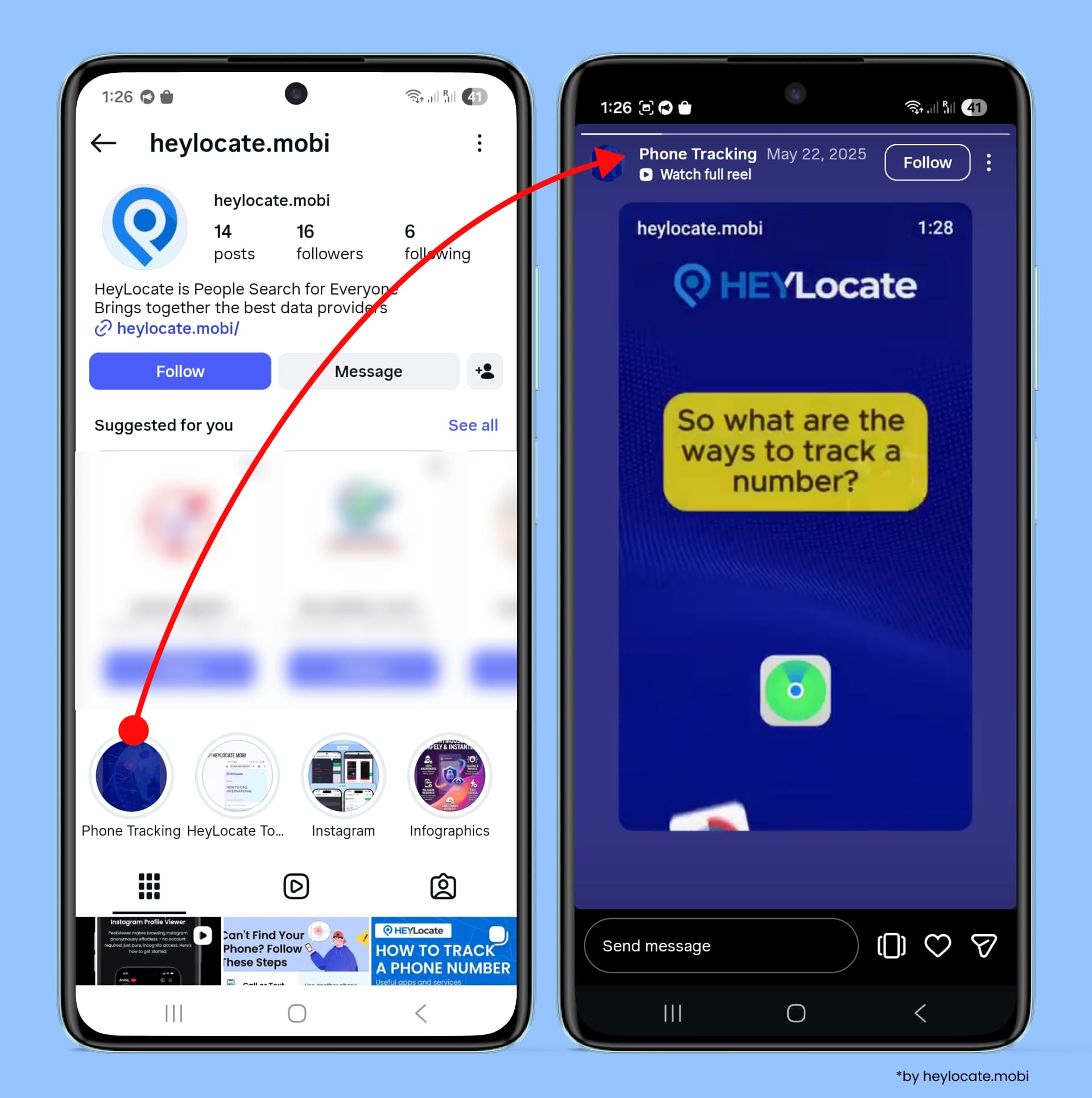
It is the most natural way, as the account owner intentionally saved Stories for later viewing. On the contrary, there are downsides: the person may not save Stories as a Highlight, it may be visible only to selected viewers, or the account is private, and you are not a follower.
Method 2: Look for the Same Content in Reels, Posts, or Tagged Photos
Sometimes people do not save a Story as a Highlight, but they reuse the same content elsewhere.
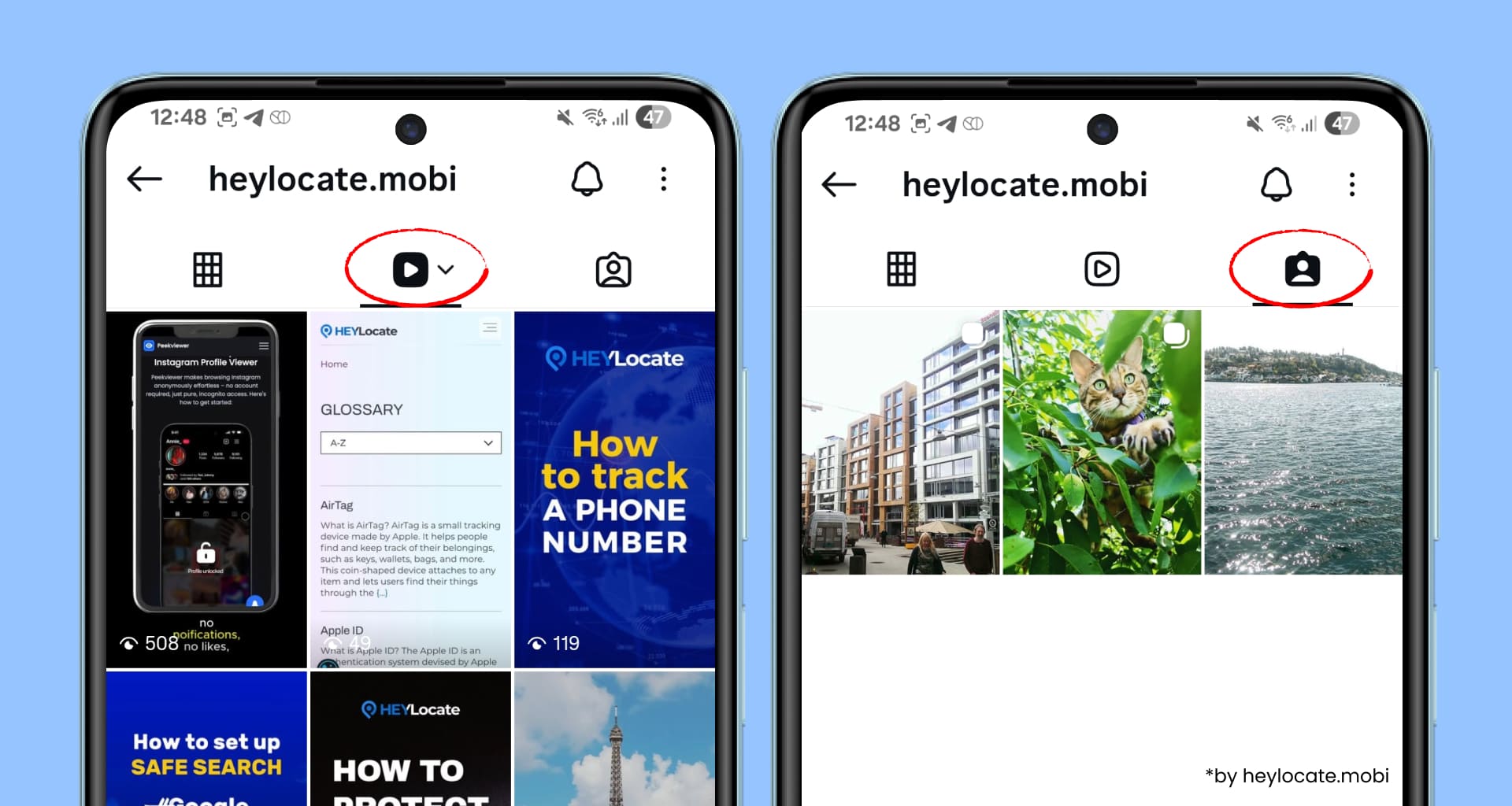
For example, a creator might first share a short travel clip as a Story and later turn it into a Reel. A brand might announce a sale in Stories and then publish the same offer as a feed post. A person might attend an event, post Stories during the day, and then appear in tagged photos from friends or event pages.
So, where can you see old stories on Instagram? Look at:
- the person’s feed posts;
- their Reels tab;
- tagged posts;
- captions with relevant keywords;
- location tags;
- hashtags connected to the event or topic;
- collaborator posts;
- brand pages or event accounts;
- fan repost pages.
This method works best when you are looking for the content of the Story, not the original Story format, and when you know what content you are searching for. You may not recover the expired Story itself, but you may still find the same information.
Method 3: Use Third-Party Viewers
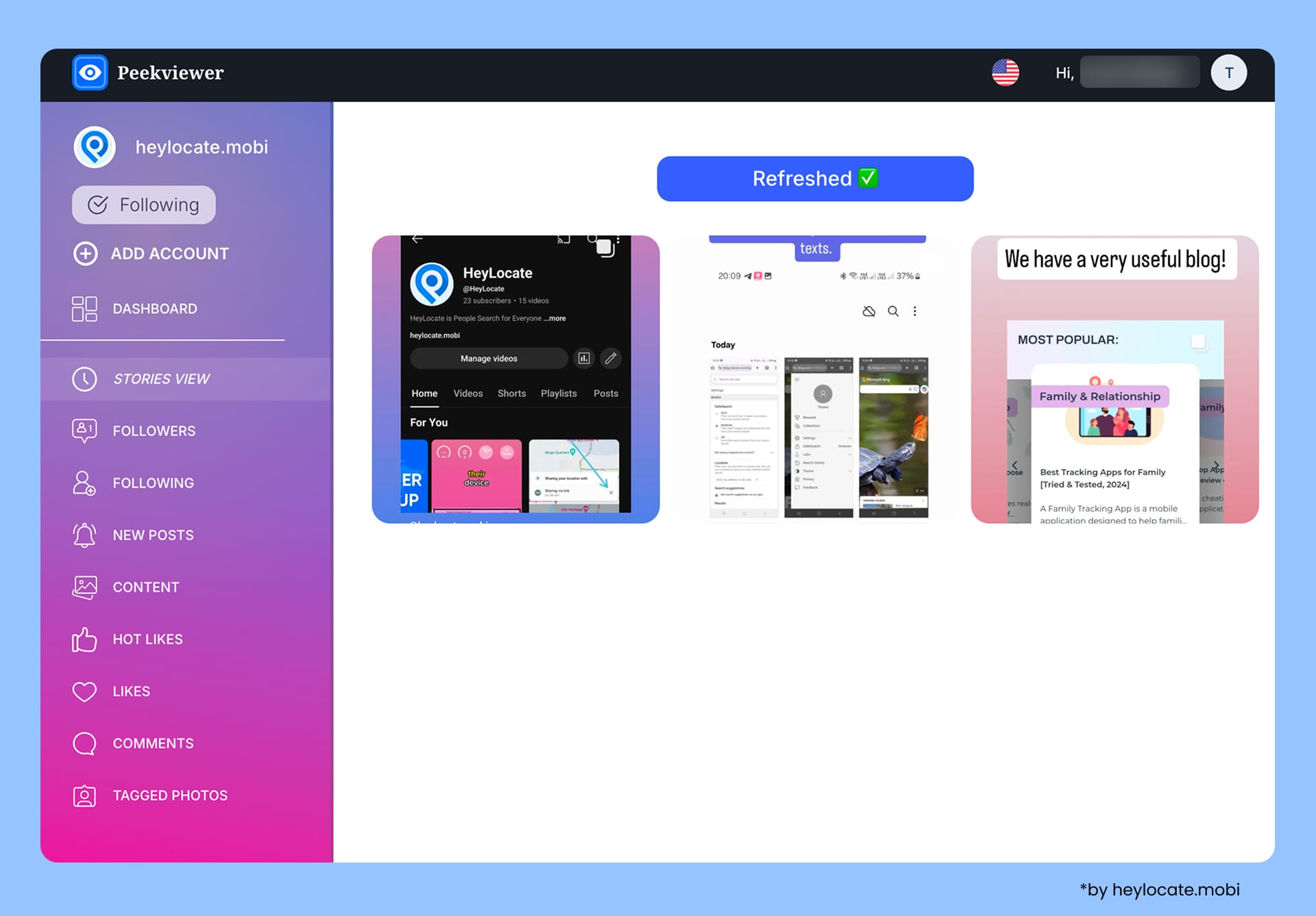
There are many Instagram story viewers that let you see someone’s Stories anonymously and without following. Still, most of them collect only the current Stories. To see old IG Stories, usually you need to create an account on the viewer platform to monitor a certain IG profile continuously.
We decided to take Peekviewer as an example, as based on testing by our HeyLocate team, it can monitor even private IG accounts. The service lets you revisit saved Stories from a personal dashboard for up to 3 months. This makes it relevant for users who need to see past Stories and want a tool-based option rather than relying only on Instagram Highlights.
Note: Peekviewer can fit use cases where there is consent, permission, or a legitimate monitoring reason, such as:
- a parent monitoring a minor child, where legally allowed;
- a brand checking an influencer or partner account with permission;
- a social media manager reviewing a client’s Instagram activity, and similar.
To use such a tool, create an account and choose the subscription. Enter the Instagram username or profile link, then wait for the profile data to become available. After a while, you will be able to view Stories and other available content in your dashboard.
Method 4: Ask the Person to Send or Repost the Story
The simplest method is often the most effective: ask the person directly.
This works especially well when you missed an event update, you need a product link, you were mentioned in the Story, you need a clip for work, you are collaborating with the person, etc.
This method respects privacy and avoids unnecessary tool use.
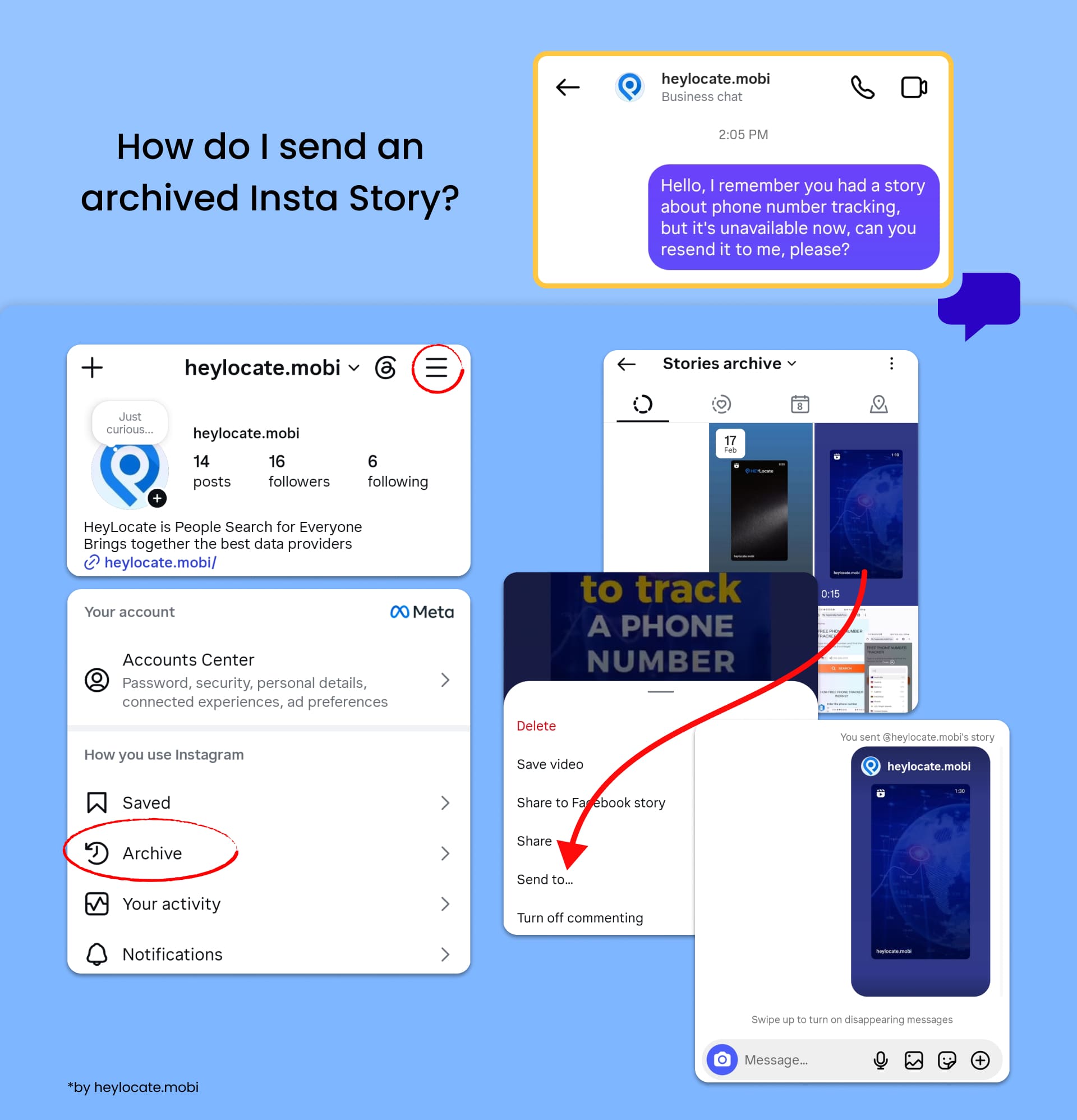
To send you their stories, the account holder needs to open it, tap three dots, and select Send to.
Method 5: Check Public Reposts, Screenshots, and External Mentions
For public figures, influencers, brands, musicians, athletes, and viral posts, old Stories often appear outside Instagram.
People may repost Stories on other platforms, such as X, TikTok, YouTube Shorts, IG fan pages, news articles, Telegram channels, Pinterest, and Facebook pages.
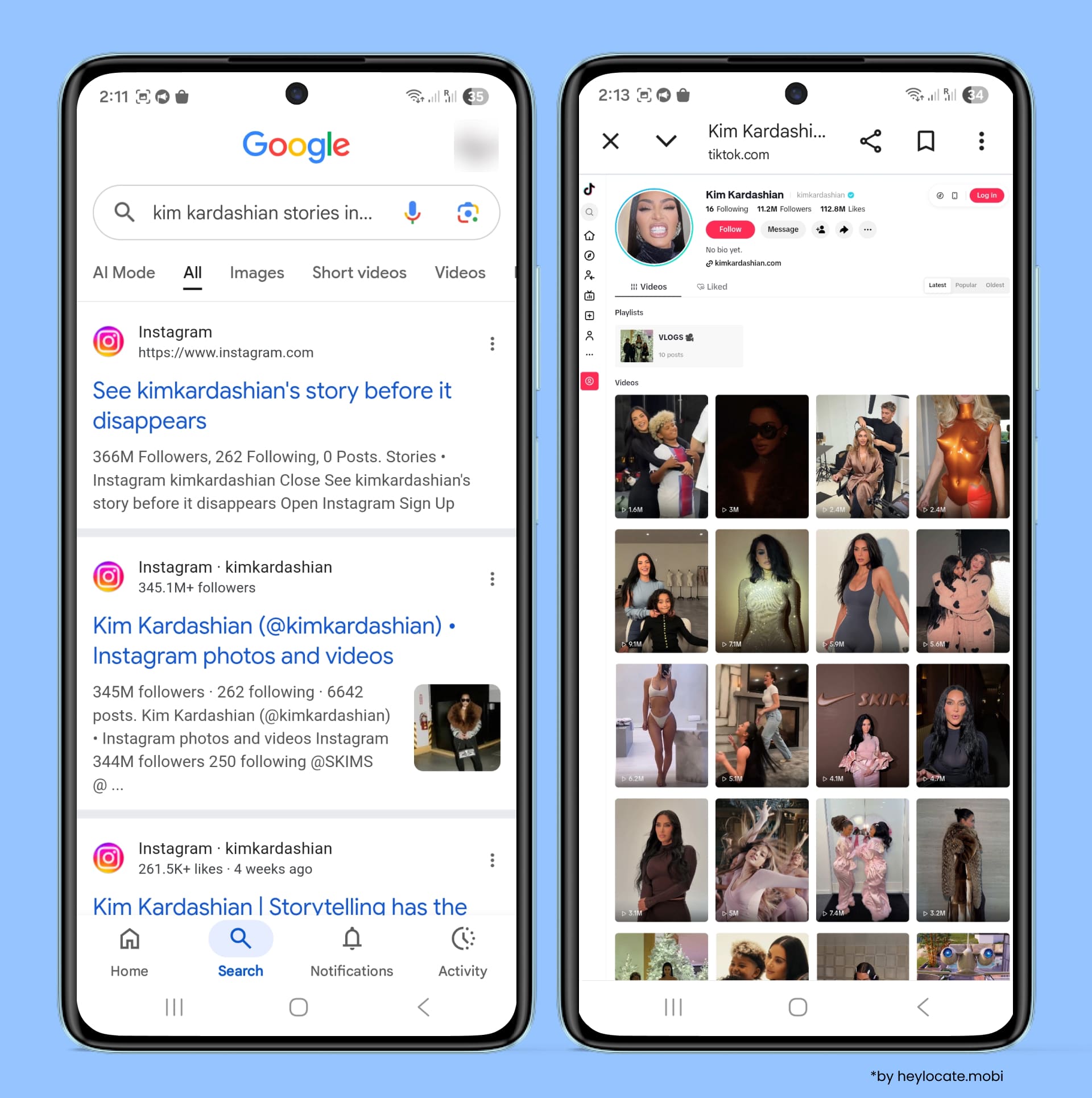
This is especially common when a Story contains a public announcement, controversy, product launch, relationship update, event clip, or behind-the-scenes moment.
Search using the person’s name, their Instagram username, keywords from the Story, event or brand name, etc.
Example search queries:
- “[username] Instagram Story yesterday”;
- “[name] IG Story product launch”;
- “[brand] Instagram Story sale”;
- “[influencer] Story screenshot”;
- “[event name] Instagram Stories”.
This method does not always work, but it can help when the Story was public or widely discussed.
Comparison of the Methods
To sum it up, with all the methods revised above, you can see someone’s old Instagram Stories only in specific cases:
| Method | Can it show past Stories? | Can I stay anonymous? | Best for |
|---|---|---|---|
| Instagram Highlights | Yes, if the person saved the Story there | No, if viewed from your account | Publicly preserved Stories |
| Reels, feed posts, tagged posts | Sometimes | Yes, if not liked | Finding the same content in another format |
| Third-party IG Viewer | Yes, including past Stories of the private accounts | Yes | Consent-based private browsing and monitoring |
| Asking the person directly | Yes, if they agree | No | Missed updates, links, clips, collaborations |
| Public reposts or screenshots | Sometimes | Yes | Influencers, public figures, viral Stories |
The safest rule is simple: if a Story was not saved, reposted, highlighted, shared, or captured through a permitted tool, you probably cannot view it later.
What Does Not Work for Seeing Someone’s Old Stories?
There are many myths surrounding viewing old Instagram Stories. Let’s address them clearly.
Myth 1: Using someone’s story archive
A person’s Instagram Story Archive belongs to that person. Followers cannot open another user’s private archive.
Myth 2: All expired Stories can be recovered
No. If the Story was not saved, reposted, highlighted, downloaded, or captured somewhere, there may be no accessible copy.
Myth 3: Private accounts can be viewable with any Story viewer
No. Many anonymous Story viewers only work with public accounts. If a tool claims private account support, users should check how it works, whether permission is required, and whether the use case is legal and ethical. During HeyLocate testing, only Peekviewer could access private IG content.
Myth 4: Close Friends Stories become public later
No. Close Friends Stories are limited to the creator’s selected audience. If you were not included, you should not expect to see them later.
Myth 5: You should give your Instagram password to a viewer tool
No. Avoid tools that ask for your Instagram username and password. That can expose your account to phishing, account takeover, or other security problems.
Myth 6: Web archives can recover Instagram Stories
The Wayback Machine and other web archives can sometimes preserve public Instagram pages, but they are not reliable for viewing Instagram Stories.
Stories are temporary, dynamic, often app-based, and frequently protected behind scripts, login prompts, and privacy controls. Even when an Instagram profile is archived, the capture may show only the profile shell, a login screen, missing images, or old feed content.
Safe and Ethical Rules Before Viewing Someone’s Past Stories
To be sure you stay within legal and ethical boundaries, use this checklist before trying any method:
- View only content you are allowed to access.
- Prefer Instagram’s native options first: Highlights, Reels, posts, and tagged content.
- Use third-party tools only with permission or a valid legal reason.
- Do not try to access DMs, passwords, hidden data, or hacked accounts.
- Do not use Story viewers to harass, stalk, shame, or pressure someone.
- Respect private accounts and Close Friends boundaries.
- Turn on two-factor authentication if you used a suspicious service in the past.
FAQ
Yes, but only if the Story was saved or made available somewhere. Check Highlights first, then Reels, feed posts, tagged content, public reposts, or a consent-based viewer dashboard.
No. Instagram Story Archive is private to the account owner. You cannot open someone else’s Archive as a follower.
Yes. If the person saved their Story as a Highlight and you are allowed to view their profile, you can watch it from their profile page.
Only if you have approved access, permission, or a legitimate consent-based way to view that account. Private accounts should not be treated as public content.
Most anonymous Story viewers only work with public accounts. Be careful with any tool that promises private access without explaining permission, legality, or security.
Based on HeyLocate testing, Peekviewer can save Stories to a personal dashboard for up to 3 months, which means users may be able to revisit Story content after it is no longer live. This should be used only with consent and permission.
Usually no. Deleted or expired Stories are not available unless they were saved, highlighted, reposted, downloaded, shared, or stored through a tool before disappearing.




Leave a Comment