




 Affiliate Disclaimer
There are various methods for finding social media profiles and online accounts linked to a specific email address, from free no-signup tools and reverse lookup services to professional OSINT techniques. All are listed in our guide, ranked by hit rate and effort. Legal guardrails and accuracy caveats are included throughout.
Why are email addresses uniquely trackable?
An email address is one of the few identifiers that most people reuse consistently across their entire online life. Social media registrations, dating profiles, forum accounts, shopping platforms, gaming services — the majority were created with the same address the subject still uses today.
That consistency is the foundation of reverse email lookup as an investigative technique. When someone registers an account using an email, they create a linkage. Many of those linkages are publicly discoverable. The goal of this guide is to surface as many of them as possible using a layered approach, moving from free and passive methods to more thorough tools when needed.
Who this guide is for:
- people verifying the identity of someone they met online (dating, marketplace, freelance);
- investigators and journalists conducting OSINT research on a person of interest;
- security researchers mapping a target’s digital footprint during authorised engagements;
- anyone who received a suspicious email and wants to assess the sender’s legitimacy.
Find Information With Email Search Right Now
Disclaimer: This article is for informational purposes only. All methods described use publicly available data or server responses that require no account access. Use findings responsibly and lawfully — how you use what you find is where legal lines are drawn. This is not legal advice.
3 Data Sources Behind Any Email Lookup
Before running any method, it is worth explaining the underlying mechanisms, because each method exploits a different type of data linkage, and understanding this helps you interpret results accurately.
Publicly Indexed Profiles
When someone registers on a platform that indexes profile pages publicly (forums, GitHub, many dating apps historically), search engines crawl and cache those pages.
The email address itself may or may not appear on the public profile, but the username associated with the email often does. This is what search operators like Google or Bing and dedicated tools like Lullar exploit.
Password-Reset Response Behaviour
When you submit a ‘Forgot Password’ request on most platforms, the server returns a different response depending on whether the email is registered. A response of ‘We sent a reset link to your email’ confirms the account exists.
A response of ‘no account found’ confirms it does not. This mechanism does not require the email owner to receive or click anything — the confirmation comes from the server’s response to your query alone.
This is exactly how the open-source OSINT tools like Holehe works. It queries 120+ platforms’ password-reset endpoints and reports which ones confirm account existence.
Data Aggregator Databases
Paid reverse lookup services like Spokeo, BeenVerified, and Social Catfish maintain proprietary databases compiled from public records, data broker feeds, historical web crawls, and (in some cases) previously breached data.
These databases are not publicly searchable but are accessible through the aggregator’s paid search interface. They are the only way to surface accounts on platforms that have no public profiles and no predictable password-reset behavior, including most dating apps.
Key Insight: No single method accesses all three data source types. A thorough lookup runs all three layers: indexed public data (search engines), password-reset confirmation (manual or through services), and aggregator databases (paid reverse lookup tool). Each layer finds things the others miss.
Method 1. Google and Bing Operator Search
Start here. A direct quoted search for the email address surfaces any publicly indexed page where that address appears: forum posts, professional directories, GitHub commits, comment sections, and public profiles that display their contact email.
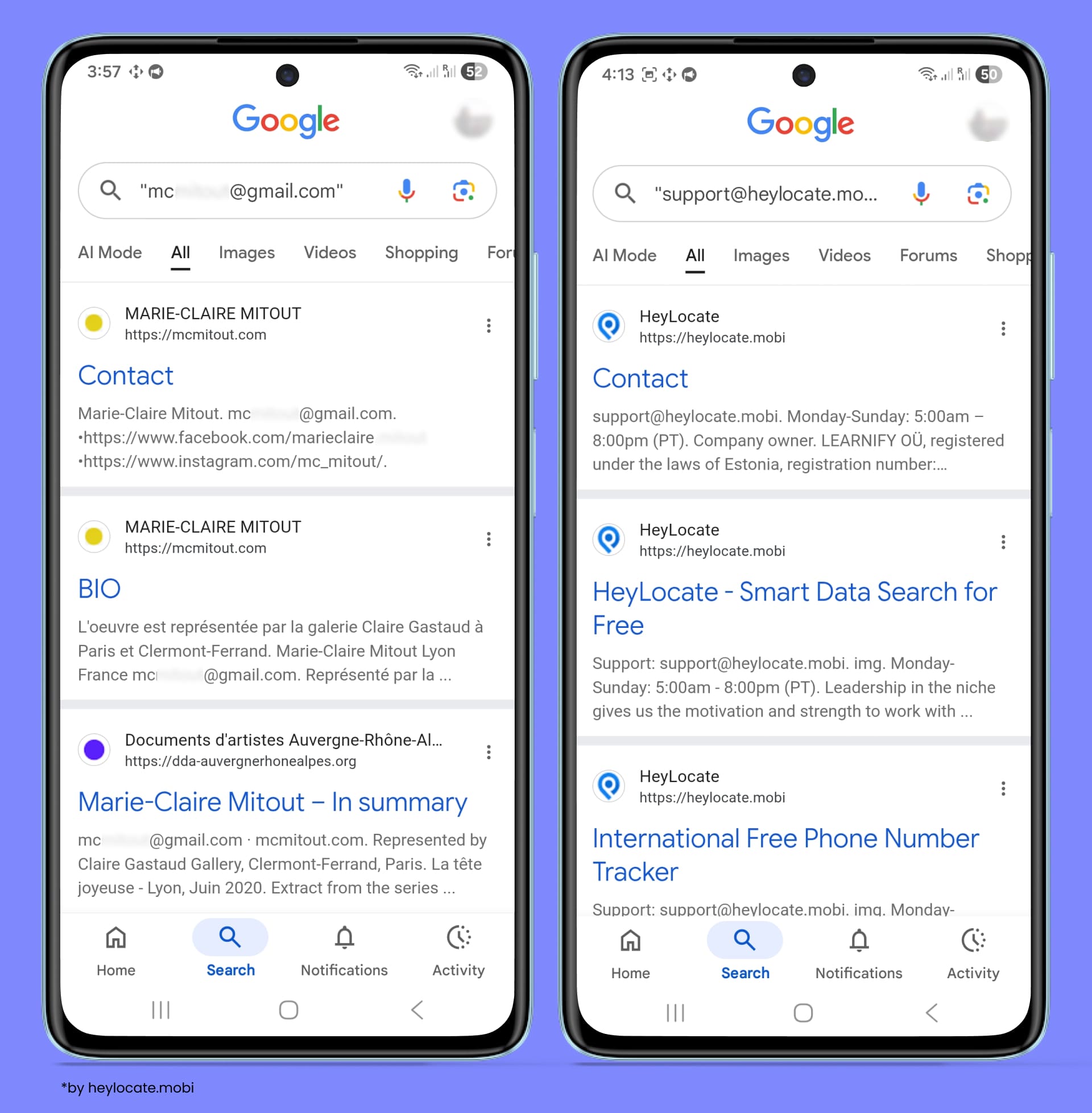
Search operators to run
“email@domain.com”— basic quoted search that surfaces indexed mentions of the exact email address;“email@domain.com” site:website.com— checks whether the exact email address appears on publicly indexed pages on a certain website.
Repeat the same searches on Bing — its crawler indexes some pages and caches that Google does not, particularly older content and smaller platforms.
⚠️ Important: This method only finds content that is publicly indexed. Private profiles, closed platforms, and anything behind a login wall will not appear. Low hit rate for privacy-conscious subjects.
Method 2. Facebook Email Search
Most major social media platforms technically supported email-based user lookup, but privacy policy changes since 2021 and afterward have severely limited what is returned for most users.
Based on our testing, only email search through the Facebook people search feature may give some hints. The success rate has dropped significantly since Meta restricted email discoverability in response to GDPR enforcement. Now, Facebook mostly uses the email name part to search for similar usernames.
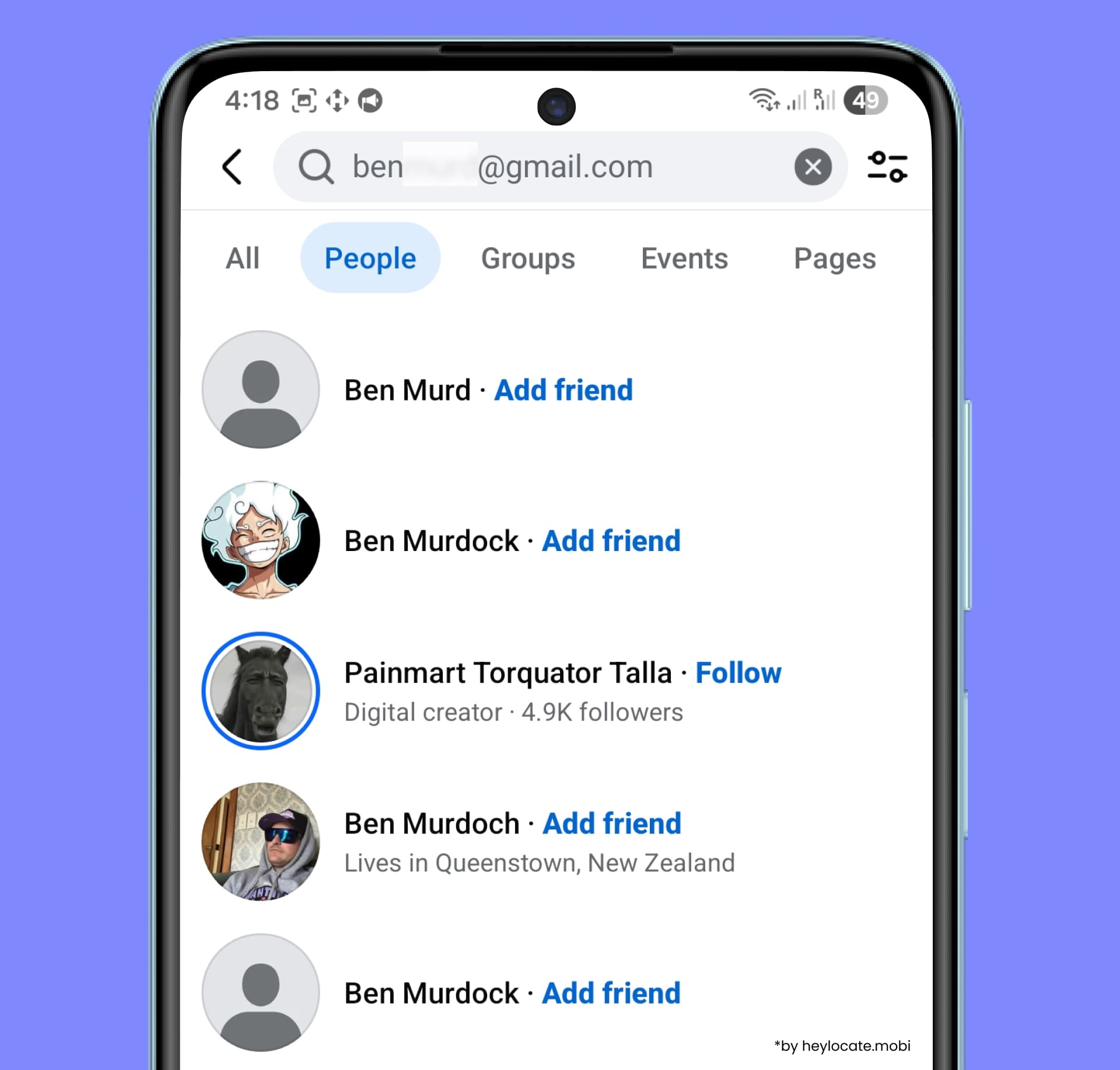
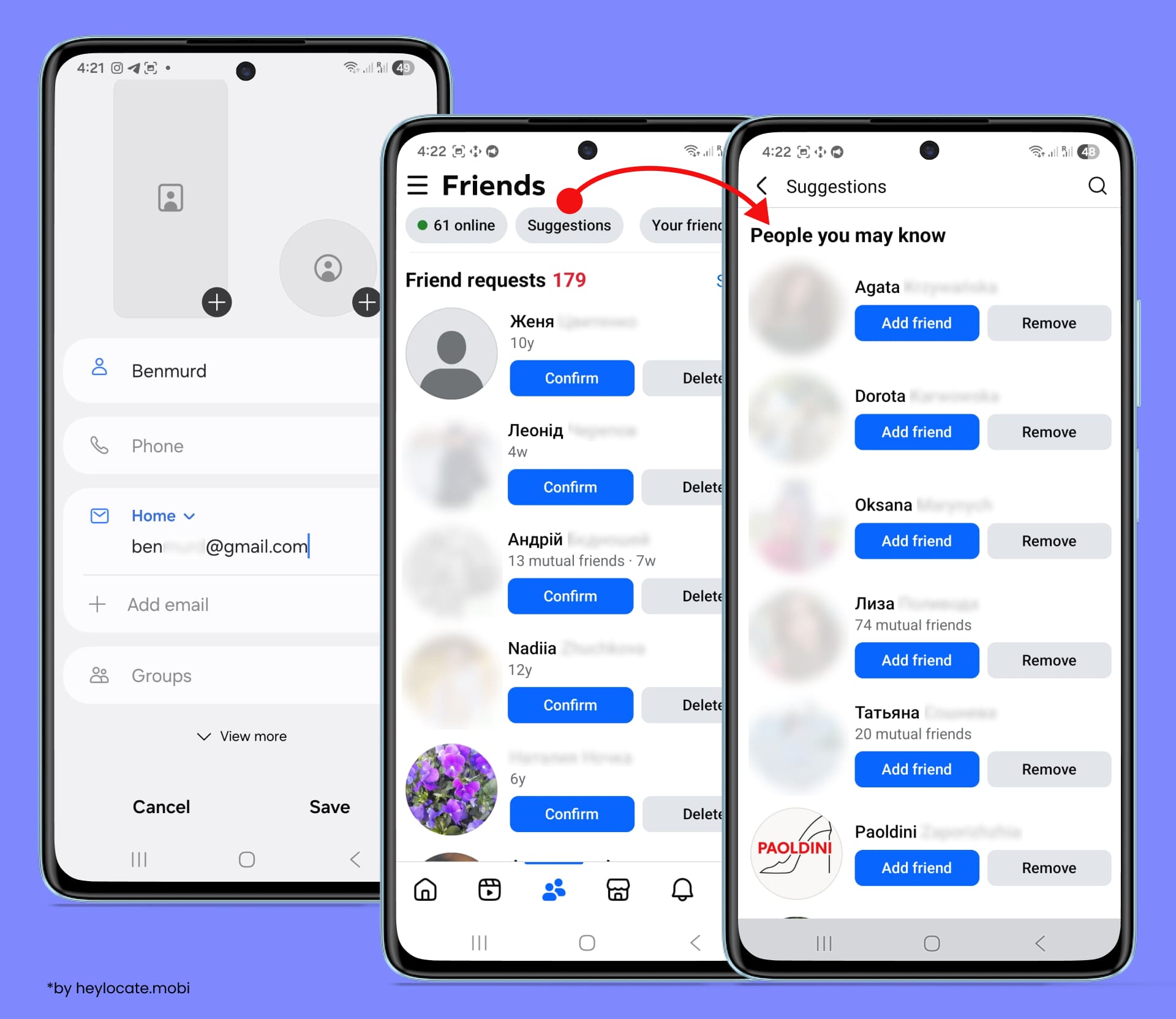
However, the Messenger contact-sync method bypasses privacy settings by exploiting how Facebook matches contacts to accounts. Here’s how to use it:
- Add the email address to your phone’s contact list.
- Open Messenger, go to People, and let it sync contacts.
- If Facebook can match that email to a registered account, Messenger will surface it as a suggested contact, regardless of whether the account has email discoverability enabled in its privacy settings.
If you don’t see friends’ suggestions, check your Facebook account settings. Go to the burger menu in the upper-left corner > Settings and privacy > Settings > Accounts Center > Your information and permissions > Upload contacts > select the Messenger profile and turn on the phone contacts uploading.
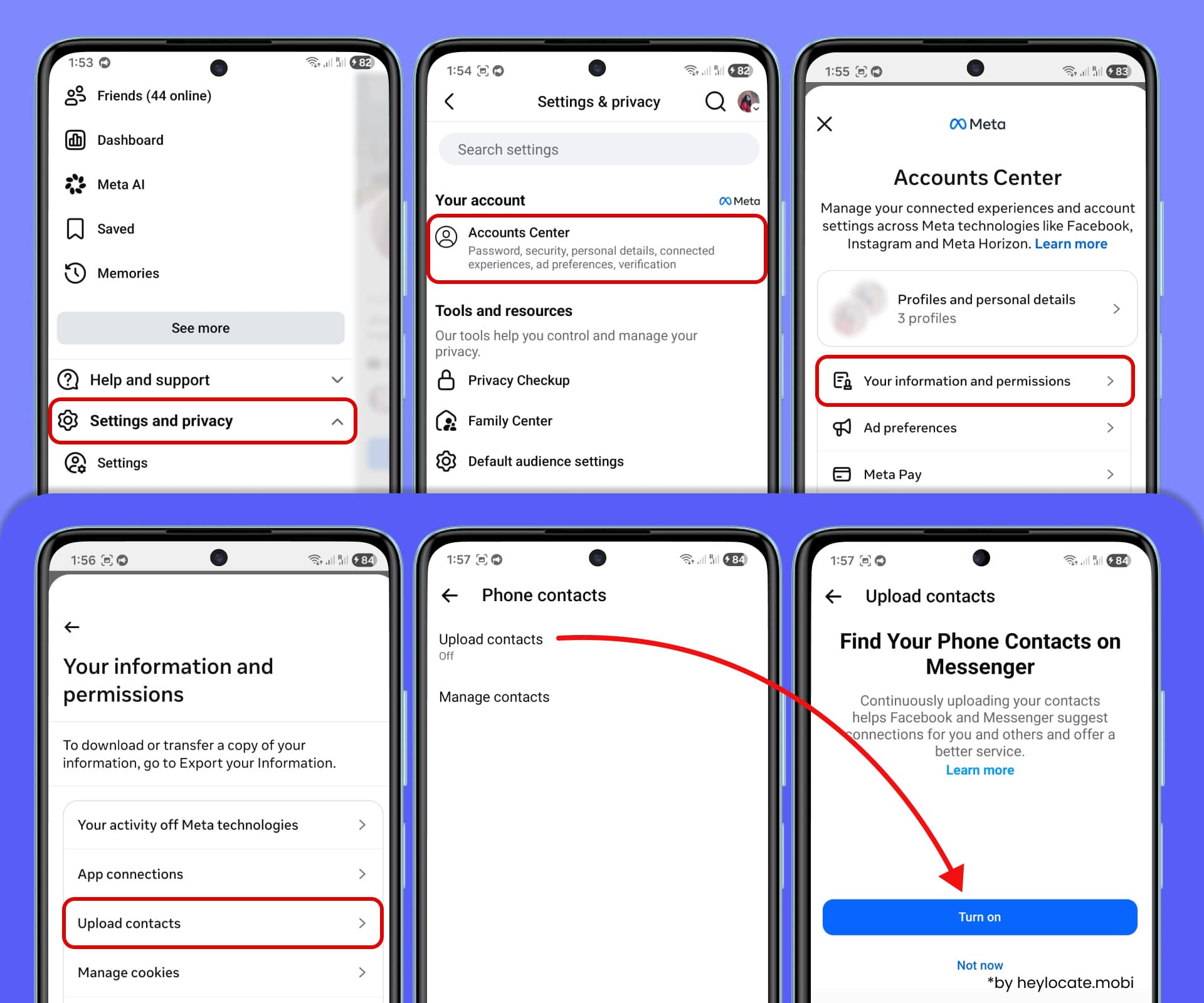
This works because the matching happens server-side during contact sync, through a different privacy pathway than the public search bar. The limitation is the same as all Facebook methods: if the account is fully deactivated, or the user registered with a different email, nothing will appear.
ℹ️ Note: Facebook periodically changes how contact sync behaves, and this trick can be partially restricted in some regions due to GDPR.
Method 3. Reverse Email Lookup Tools
There are free tools for reverse email address lookup that do the indexing work for you. They search dozens or hundreds of platforms simultaneously and return matched profiles. These are HeyLocate Free Reverse Email Address Lookup, MailMeteor, Lullar.com, or WhatsMyName.app. They often search using both the full address and the username prefix.

Free methods work well for subjects with an established, public online presence. However, they hit hard limits when: the subject uses privacy settings consistently, the most important accounts are on dating platforms (which have no public profiles), or you need a comprehensive identity report rather than a list of usernames.
The best reverse email lookup tools may require payment but can access proprietary databases compiled from data broker feeds, historical web crawls, and specialized platform scraping that free tools cannot reach.
For example, Social Catfish is best for romance scam detection as it searches 300+ sources, Spokeo or BeenVerified – for comprehensive identity report with address history, criminal records, and social profiles.
There are more sites for social media search by email address.

⚠️ Accuracy expectation: In practice, accuracy is highest for US-based subjects who have had a stable online presence for 5+ years. It drops for non-US subjects, people under 25, and anyone who actively manages their digital footprint. Always treat paid tool results as high-probability leads, not confirmed facts.
Method 4. Search by Email Username
Most people reuse their email username (the part before the @) as their handle across platforms. This creates a cross-platform thread that can be pulled even when platforms block direct email lookup.
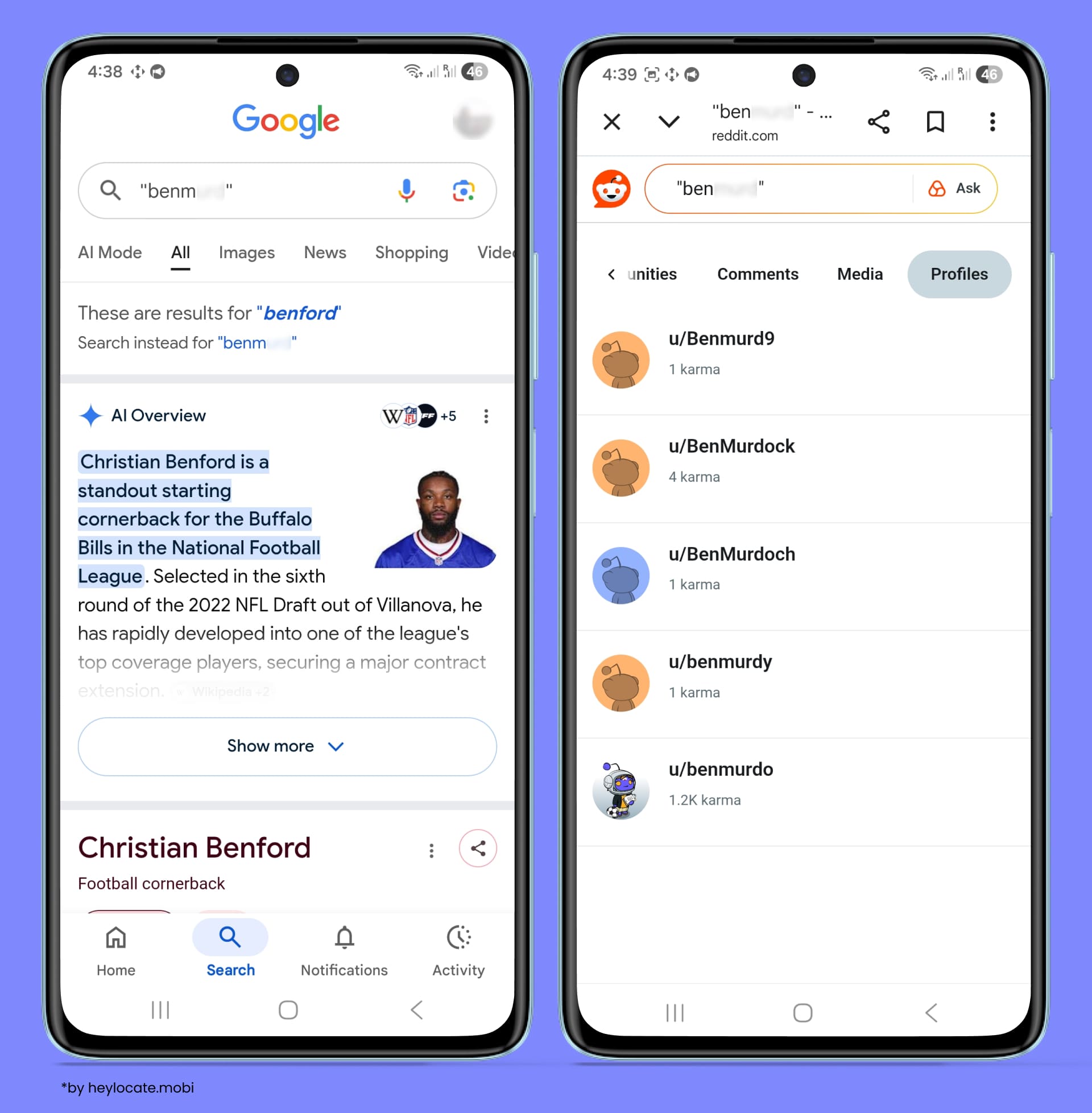
Here’s how this method works:
-
Extract the username from the email address. For example, from john.smith87@gmail.com, the username to check is john.smith87.
-
Search for that username across public platforms. You can check whether the same handle appears on social networks, forums, developer communities, marketplaces, or content-sharing sites.
This can be done manually through search engines and platform searches, or with username-checking tools such as WhatsMyName, Sherlock, Maigret, or similar services. -
Try common username variations. People may slightly change the same handle from one platform to another. For example, check versions with dots removed, dots replaced by underscores, or numbers added or removed: john.smith87, johnsmith87, john_smith87, jsmith87.
-
Use quoted search for exact matches. Search the username in quotation marks to find exact public mentions in profiles, posts, comments, forums, GitHub commits, or archived pages.

-
Verify matches before drawing conclusions. A matching username alone does not prove that an account belongs to the same person. Review only publicly available context, such as display name, avatar, bio, linked websites, location, or repeated usernames across platforms.
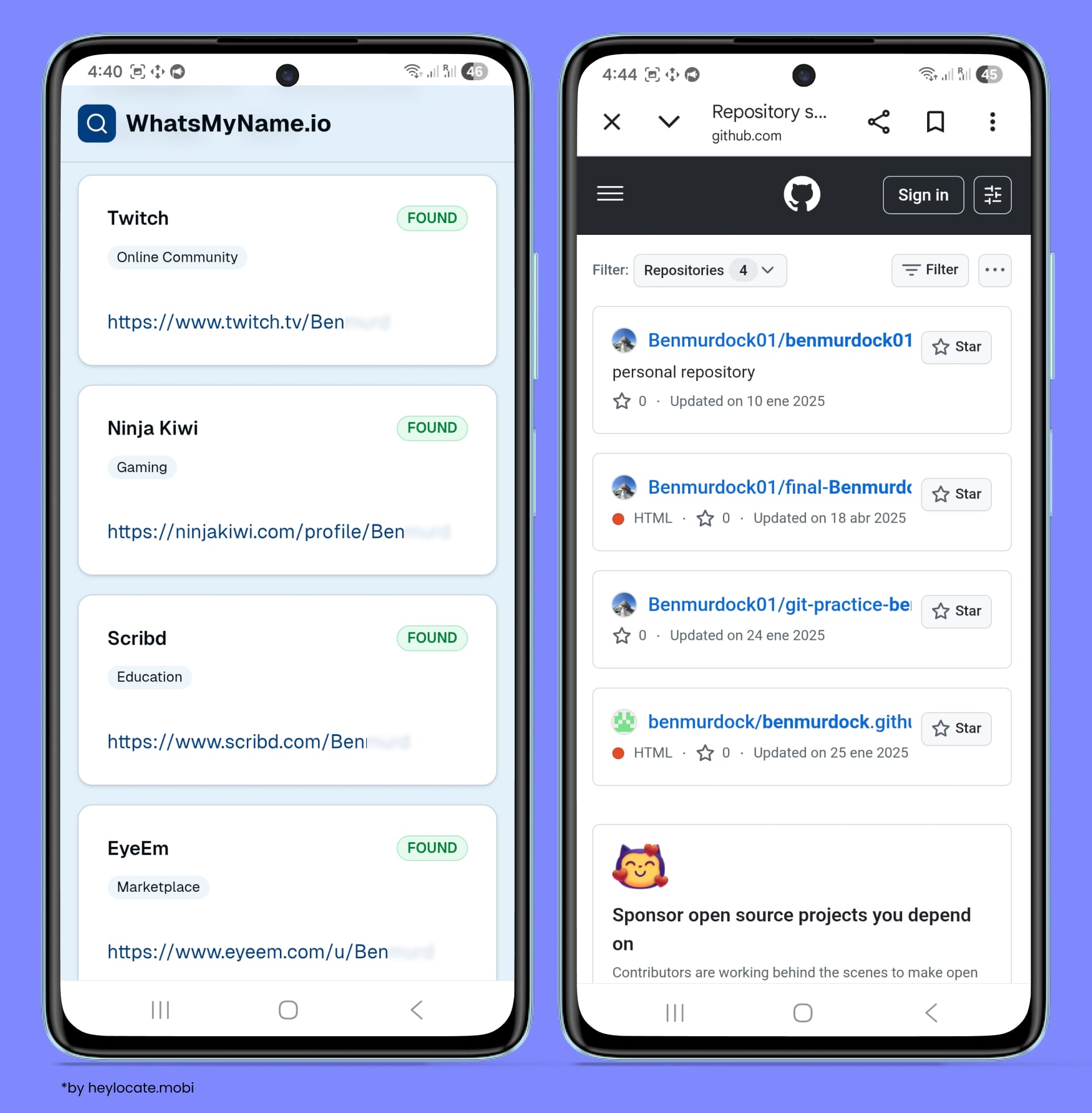
ℹ️ Note: This method works best when the email username is distinctive. Generic usernames or common names may return many unrelated results, so each match should be treated as a lead rather than confirmed identity information.
Why this works so well: Unlike email-based lookups, username-based searches bypass platform privacy settings entirely. A platform may hide that john.smith87@gmail.com is registered, but the public profile page at platform.com/john.smith87 remains visible and indexed. Searching by email username reaches profiles that email-based methods cannot.
Method 5. Check Account-Existence Signals
Some websites reveal whether an email address is connected to an account during sign-in, registration, or account-recovery flows. This can sometimes help confirm whether an email is associated with a public platform, especially when direct email search does not return useful results.
⚠️ Note: You won’t find the precise user’s account page, but you may discover whether their email was used on the platform.
There are two ways to approach this: manually, by checking individual platforms, or automatically, by using OSINT tools that test multiple platforms at once.
To do it manually, go to any platform’s ‘Forgot Password’ or ‘Sign In’ page, enter the target email address, and observe the server’s response:
- “We’ve sent a reset link to that address” or “Check your email” = account confirmed to exist;
- “No account found with that email” or “We don’t recognize that address” = no account;
- “If an account exists, we’ll send an email” (ambiguous response) = platform obscures existence for privacy; inconclusive.
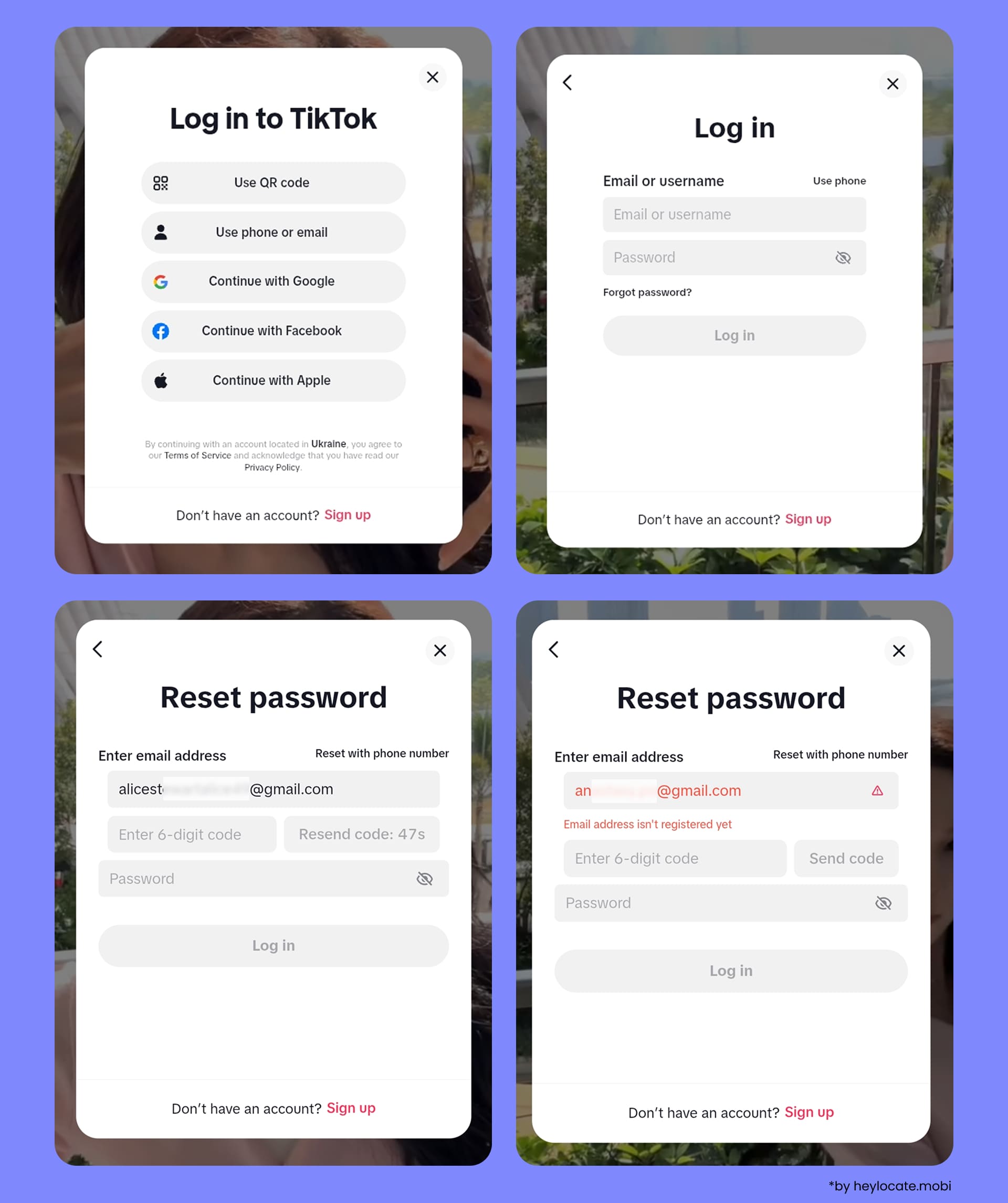
⚠️ Important: Ethical boundary: observe the server response only. Do not click any reset link that arrives, and do not attempt to access the account. Triggering password resets you do not follow through on is not harmful, but initiating an actual account takeover crosses into unauthorized computer access — illegal in virtually every jurisdiction.
For automated account discovery, use OSINT tools that check many platforms, such as Holehe, Epieos, and similar email-investigation services. These platforms may report whether an email appears to be registered on certain platforms.
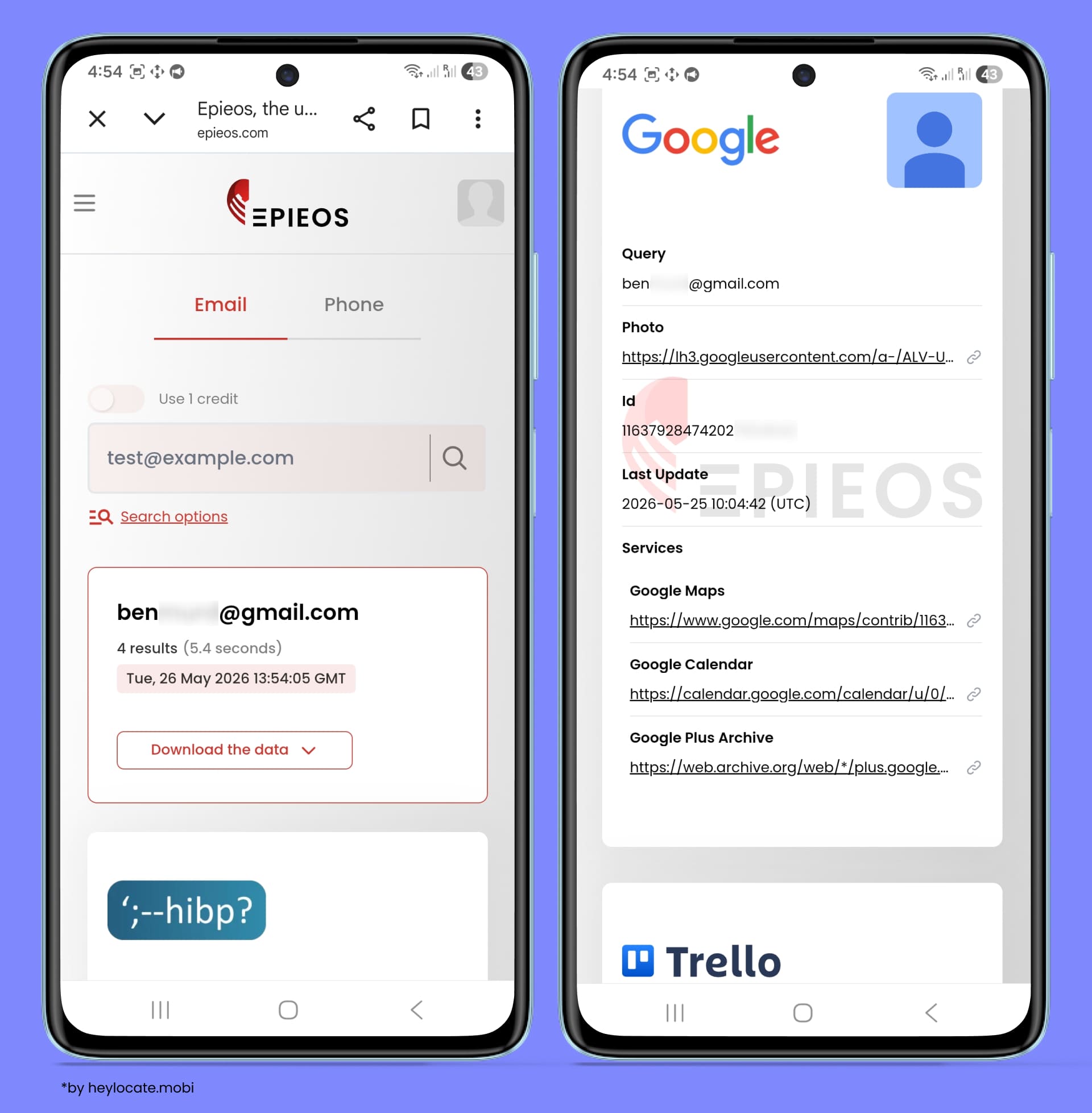
Automated tools can save time, but their results should still be treated as leads rather than absolute proof. Platform responses change, rate limits may affect results, and privacy-protective systems often make account existence impossible to confirm.
Method 6. Check Data Breach Databases
Data breach databases can help identify services where an email address appeared in previously leaked or compromised records. For OSINT purposes, this can provide historical account signals: if an email appears in a breach linked to a specific platform, it likely means the address was registered or stored by that service at the time of the incident.
This method is especially useful for finding older accounts, accounts on services that no longer exist, renamed platforms, or registrations that may no longer appear in normal search results.
To search the email in a breach notification database, use services such as Have I Been Pwned, Mozilla Monitor, or similar breach-checking platforms that can show whether an email address appeared in known public breaches.
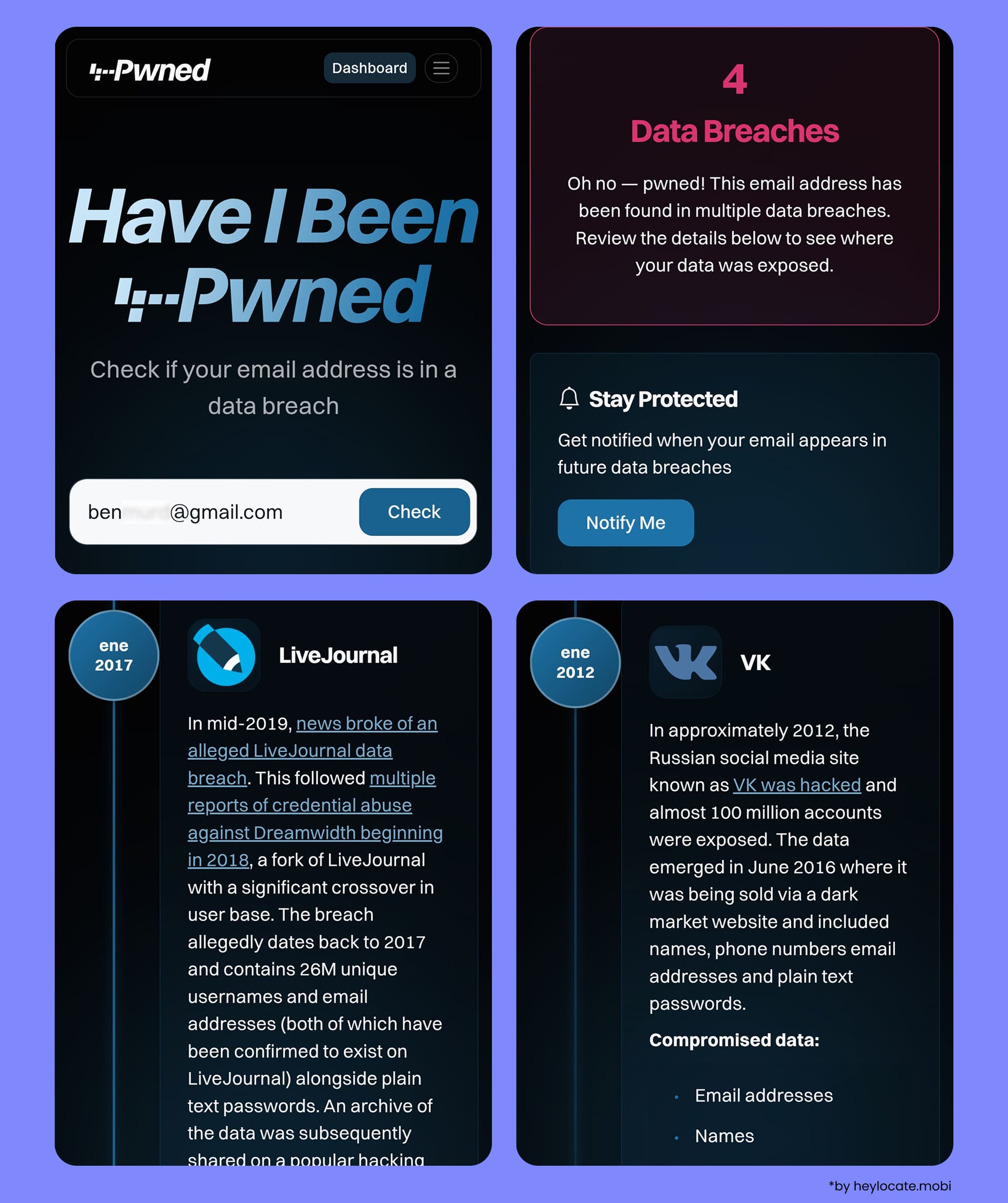
Each returned service name can be treated as a historical account lead. It does not always prove that the account still exists, but it suggests that the email was connected to that platform at the time the data was exposed.
Use the breach results to build a list of platforms worth checking further through public profiles, username searches, account-recovery signals, or direct platform searches.
Limitations: Breach data can be outdated, duplicated, misattributed, or linked to services that have since shut down or changed names. Treat results as investigative leads, not final proof of current account ownership.
What If the Email Returns No Results?
No results can mean:
- the email is new or rarely used online;
- the subject uses privacy settings that block public indexing;
- they use a different email per platform (alias strategy);
- or the email domain is a corporate/custom domain that aggregators handle poorly.
Try the username-pivot method and a breach lookup before concluding nothing exists.
Comparison Table of All Methods
The table below summarizes all six email lookup methods covered in this guide. Use it to decide where to start based on your available time, technical comfort level, and what type of accounts you are trying to find.
| Method | Cost | Hit rate | Best for | Key limitations |
|---|---|---|---|---|
| 1. Search engine operators | Free | 2/5 ★★☆☆☆ Low–medium | Public forums, directories, GitHub, comment sections. | Only finds publicly indexed pages. Private profiles invisible. |
| 2. Social platform search | Free | 1/5 ★☆☆☆☆ Low | Quick sanity check on major platforms. | Privacy changes since 2021 have severely restricted results. Facebook is the only partial exception. |
| 3. Reverse email lookup tools | Free + paid | 3/5 ★★★☆☆ Medium to High | Broad profile discovery; dating/romance scam checks; identity reports. | Free tools miss private profiles and dating apps, but paid tools catch up with this. |
| 4. Email username search | Free | 4/5 ★★★★☆ High (for distinctive usernames) | Cross-platform username tracking; bypasses platform privacy settings; finding profiles email search misses. | Common or generic usernames return many unrelated results. Requires manual verification of each match. |
| 5. Account-existence signals | Free | 3/5 ★★★☆☆ Medium | Confirming whether an email is registered on a specific platform; automated multi-platform checking. | Confirms existence only — does not reveal the profile or its content. |
| 6. Data breach databases | Free | 2/5 ★★☆☆☆ Low–medium | Finding historical accounts; surfacing old or defunct platform registrations. | Data is historical — does not prove accounts currently exist. |
How to Combine Methods for Best Results
No single method gives a complete picture. Search engines, username checks, account-existence signals, and breach databases all show different types of information. The strongest results come from comparing these signals and looking for overlap.
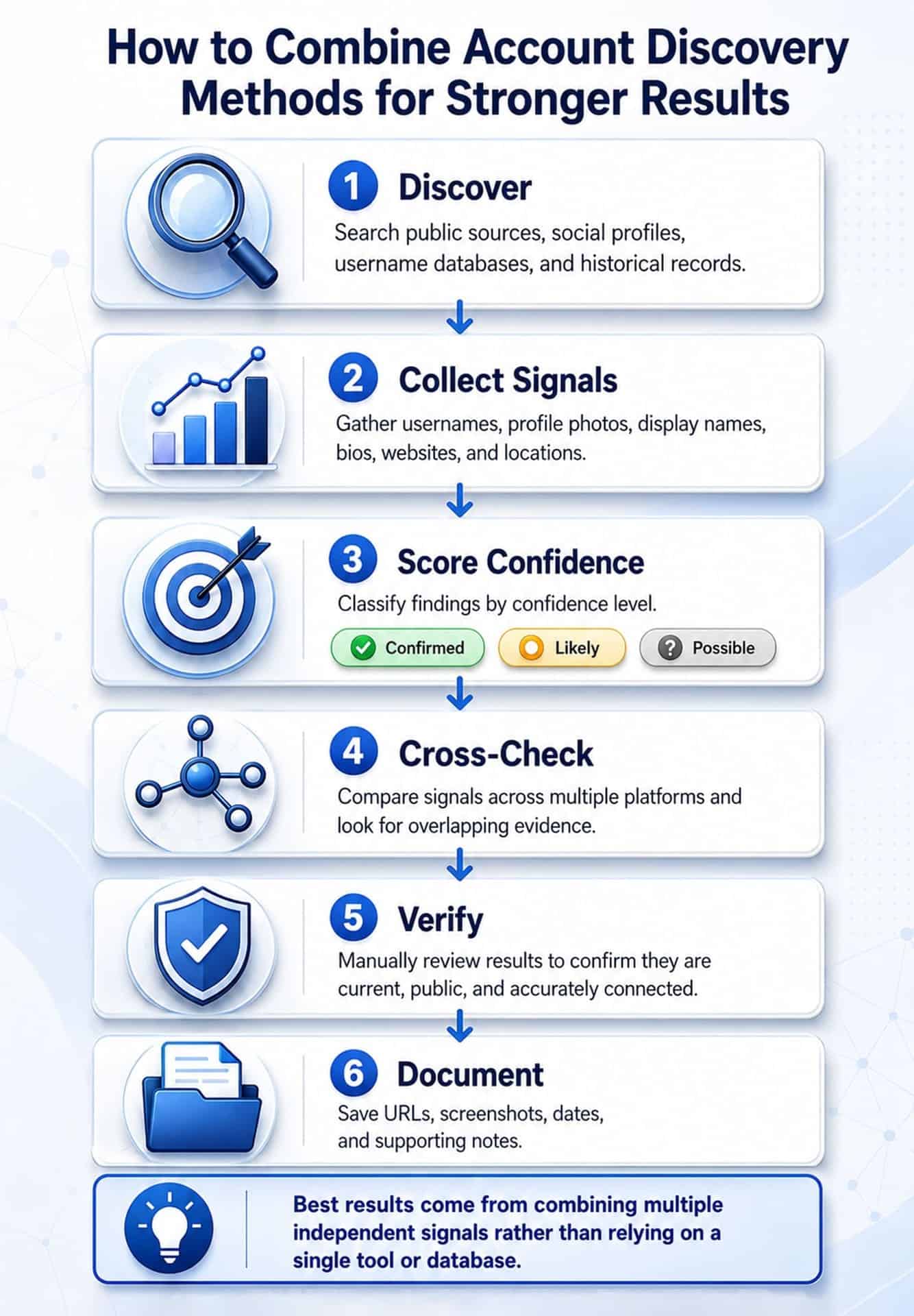
Start with broad discovery. Use public search, social-profile checks, username searches, and breach-history checks to collect possible matches.
Next, separate the results by confidence level:
- “Confirmed” — the email, username, or profile is clearly connected to the same account or public identity;
- “Likely” — several details match, such as the same username, profile photo, display name, website, or location;
- “Possible” — the result may be relevant, but there is not enough supporting evidence yet.
Then cross-check the findings. A username match on one platform is weak by itself, but the same username appearing with the same avatar, bio, website, or linked profile on multiple platforms is much stronger. Breach results can also help explain historical account links, even when the current profile is no longer public or the service has changed names.
For a deeper review, combine automated results with manual verification. Automated tools can quickly surface possible platforms, but manual checking is still needed to confirm whether a result is current, public, and actually connected to the person or email being researched.
Document important public findings at the time you discover them, because profiles can be edited, deleted, or made private later. Save URLs, screenshots, dates, and short notes explaining why each result was marked confirmed, likely, or possible.
This combined approach keeps the process organized and avoids relying too heavily on any single tool or database. It also helps prevent false positives, especially with common names, reused usernames, old breach data, or accounts that may belong to different people.
Legal and Ethical Guardrails
Reverse email lookup sits in a clear legal space when used appropriately and a clear illegal one when it is not. The legality turns almost entirely on purpose and method, not on the act of searching itself.
Permitted Use Cases
- verifying the identity of a person before a financial transaction, meeting, or professional engagement — using publicly available data;
- journalism and investigative research into matters of demonstrable public interest;
- security research with appropriate authorization, scope limitation, and responsible disclosure;
- parental monitoring of a minor child’s accounts in jurisdictions where this is permitted;
- personal safety verification — confirming a person is who they claim to be.
Legally Problematic Use Cases
- using findings to harass, stalk, intimidate, or make threats toward the subject — criminal in every jurisdiction regardless of how the information was obtained;
- EU/GDPR context: processing personal data found through reverse lookup without a lawful basis under GDPR Article 6. Employers screening candidates must disclose and obtain consent in most EU member states;
- accessing the subject’s accounts, inboxes, or device data without authorization—computer fraud laws (CFAA in the US, Computer Misuse Act in the UK) apply regardless of whether you ‘only looked’;
- using reverse lookup results to discriminate in employment, housing, credit, or insurance decisions in ways that violate anti-discrimination law;
- scraping platforms at scale in violation of their Terms of Service — separately actionable regardless of what the underlying data is.
This article is not legal advice. Laws vary by jurisdiction, change over time, and depend on specific facts. If you are conducting an investigation that may result in legal proceedings, civil action, or employment decisions, consult a qualified attorney before proceeding.
FAQs
There are never 100% guarantees that any method or service shows all accounts associated with email. Free tools search for public profiles. The username-pivot method often surfaces additional accounts. Dating profiles and private accounts require paid tools. Use all these methods together.
“Hidden” usually means the profile exists but isn’t surfaced by direct email search — not that it’s truly invisible. The most effective free approach is the username pivot: extract the username from the email address and run it through tools like WhatsMyName. Profiles that block email-based lookup often still have publicly indexed profile pages reachable by username. Complement this with a quoted Google search for the username and a breach database check.
Free methods rarely surface dating profiles because platforms like Tinder, Bumble, and Hinge actively block public indexing and email-based lookup. Social Catfish and BeenVerified specifically index dating platforms and are the most effective options for this use case.
Most reverse lookup tools and OSINT services do not notify the subject. The only method that risks notification is manually triggering a password reset link, which is why OSINT methodology recommends observing the server response only — never clicking or following through.




 Monday-Sunday: 5:00am - 8:00pm (PT)
Leave a Comment